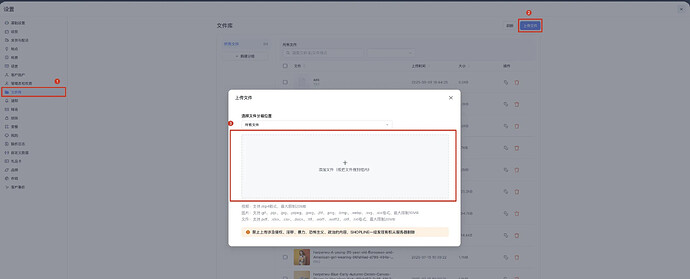
1. Admin 后台上传 txt 文件
路径:设置 -> 文件库 -> 上传文件 -> 添加文件

SkuSync is a specialized data transformation tool designed to convert standard e-commerce product exports into formats optimized for Large Language Models (LLMs) and Retrieval-Augmented Generation (RAG) pipelines.
Raw HTML and CSV data are noisy for AI models. SkuSync strips away presentation layers and structures your product catalog into semantic data that AI agents can "read" efficiently, reducing token usage and improving context understanding.
Follow these steps to generate your first AI-ready dataset. No coding knowledge is required.
Go to your SHOPLINE admin panel, navigate to Products, and export your catalog as "All products".
Drag your CSV into SkuSync. The browser-based engine parses it instantly without server uploads.
Analyze competitor websites for AI-ready data formats. Discover how easily Large Language Models (LLMs) can parse their content and identify opportunities to outperform them.
AI Checker scans any website for AI-ready data formats that help LLMs understand and index product content. It's like an SEO audit, but for the AI era.
Standardized AI documentation file that tells LLMs about your site structure and content
Structured data that helps search engines and AI understand product information
Machine-readable data stream for efficient bulk processing by AI systems
Search engine crawler instructions that AI agents also respect
Site structure map that helps crawlers discover and index all your pages
AI Checker calculates a 0-100 score based on three key dimensions:
How easily AI agents can find and access your data (llms.txt, sitemap.xml, robots.txt)
How well your content is organized with semantic markup (Schema.org, structured data)
How easily machines can parse and understand your data (NDJSON feeds, clean formats)
The AI Readiness Score (0-100) is calculated based on the presence and quality of AI-ready data formats. Each component contributes to the total score according to its importance for AI discoverability.
| Component | Max Score | Scoring Rules |
|---|---|---|
| descriptionllms.txt | 25 | Basic existence: 15 pts<br>Complete version: +10 pts |
| schemaSchema.org | 35 | High quality (≥6 fields): 35 pts<br>Medium (≥3 fields): 20 pts<br>Low (<3 fields): 10 pts |
| data_objectNDJSON/API | 25 | NDJSON exists: 25 pts<br>Only JSON API: 15 pts |
| mapDiscoverability | 15 | sitemap.xml: 8 pts<br>robots.txt: 7 pts |
| Total Maximum | 100 | |
Schema.org structured data is the international standard that AI models (ChatGPT, Claude, Gemini) use to understand web content. Without it, AI cannot accurately parse product information, severely impacting your visibility in AI-powered search results.
Use AI Checker to discover AI readiness gaps and gain a competitive edge.
searchTry AI Checker NowAI Checker does not generate files automatically. Use these templates as implementation references when a rule fails or warns.
# Brand / Site Name

## Docs
- [About](https://example.com/about): Company overview
- [Policies](https://example.com/policies): Policy index

## Products
- [Catalog](https://example.com/products): Product index# Brand Long-form Context
## Policies
...
## Product Knowledge
...
## Support FAQ
...{"item_id":"SKU-1","title":"Demo Product","description":"Short product summary","url":"https://example.com/products/demo","brand":"Brand","seller_name":"Store","seller_url":"https://example.com","is_eligible_search":true}
{"item_id":"SKU-2","title":"Demo Product 2","description":"Short product summary","url":"https://example.com/products/demo-2","brand":"Brand","seller_name":"Store","seller_url":"https://example.com","is_eligible_search":true}<?xml version="1.0" encoding="UTF-8"?>
<rss version="2.0">
<channel>
<title>Brand Updates</title>
<link>https://example.com</link>
<description>Latest updates</description>
</channel>
</rss>User-agent: *
Allow: /
Sitemap: https://example.com/sitemap.xml
User-agent: Google-Extended
Allow: /<?xml version="1.0" encoding="UTF-8"?>
<urlset xmlns="http://www.sitemaps.org/schemas/sitemap/0.9">
<url>
<loc>https://example.com/products/demo</loc>
<lastmod>2026-03-01T09:00:00Z</lastmod>
</url>
</urlset><meta name="robots" content="index,follow,max-snippet:160,max-image-preview:large" />
X-Robots-Tag: index, follow, max-snippet:160<link rel="canonical" href="https://example.com/products/demo" />
<link rel="alternate" hreflang="en-US" href="https://example.com/en/products/demo" />
<link rel="alternate" hreflang="fr-FR" href="https://example.com/fr/products/demo" />
<meta property="og:title" content="Demo Product" />
<meta property="og:description" content="Demo summary" />
<meta property="og:image" content="https://example.com/og.jpg" />
<meta name="twitter:card" content="summary_large_image" />{
"@context": "https://schema.org",
"@type": "Organization",
"@id": "https://example.com/#organization",
"name": "Brand",
"sameAs": ["https://x.com/brand", "https://www.linkedin.com/company/brand"]
}
{
"@context": "https://schema.org",
"@type": "Article",
"headline": "How to choose a product",
"datePublished": "2026-03-01"
}/* TEAM */
Team: Brand Team
Contact: team@example.com
/* SITE */
Language: en-US
Standards: HTML5, JSON-LDContact: mailto:security@example.com
Expires: 2027-12-31T23:59:59Z
Preferred-Languages: en, zhSkuSync automatically detects and supports both Shopify and SHOPLINE export formats. Upload your CSV file - the tool will identify the platform and parse accordingly.
Handle,Title,Body (HTML),Vendor,Price,Image Src
classic-tee,"Classic Cotton Tee","<p>100% organic cotton</p>",BrandX,29.99,https://.../tee.jpg
slim-jeans,"Slim Fit Denim","<p>Indigo wash</p>",BrandX,89.00,https://.../jeans.jpgSkuSync automatically detects whether your CSV is from Shopify or SHOPLINE by analyzing the header structure. No manual configuration needed - just upload and go!
The JSON Schema output provides a strict type definition for your product data. This is essential when using "Function Calling" or "Tools" with OpenAI's GPT-4 or Anthropic's Claude, ensuring the model generates valid parameters.
Following the proposed/llms.txtstandard, this format uses simplified Markdown to present content. It strips HTML tags, script blocks, and CSS classes, leaving only the semantic content relevant for training or context windows.
# Product Catalog Context
## Classic Cotton Tee
ID: 10234
Price: $29.99
Description: 100% organic cotton, pre-shrunk, available in earth tones.
## Slim Fit Denim
ID: 10235
...NDJSON is the preferred format for bulk data ingestion into vector databases like Pinecone or Weaviate. Each line is a standalone valid JSON object, allowing for stream processing without loading the entire dataset into memory.
Learn how to integrate SkuSync outputs into your AI-powered workflows and applications.
Use the generated JSON Schema with OpenAI's Function Calling for structured product queries.
// Using JSON Schema with OpenAI Function Calling
const response = await openai.chat.completions.create({
  model: "gpt-4",
  messages: [{ role: "user", content: "Find red shoes under $50" }],
  functions: [{
    name: "search_products",
    parameters: jsonSchema // Use generated JSON Schema
  }]
});
Import NDJSON output into Pinecone or other vector databases for semantic search.
// Importing NDJSON to Pinecone
const fs = require('fs');
const ndjsonLines = fs.readFileSync('products.ndjson', 'utf-8').split('\n');

for (const line of ndjsonLines) {
  if (line.trim()) {
    const product = JSON.parse(line);
    await pineconeIndex.upsert({
      vectors: [{
        id: product.id,
        metadata: product,
        values: await embed(product.triples.join(' '))
      }]
    });
  }
}
Build a Retrieval-Augmented Generation pipeline using llms.txt as context.
// RAG Pipeline with llms.txt context
async function queryProductCatalog(userQuery) {
  // 1. Retrieve relevant context from llms.txt
  const context = retrieveContext(userQuery, llmsTxtContent);

  // 2. Augment query with context
  const prompt = `Context:
${context}

Question: ${userQuery}`;

  // 3. Generate response
  return await llm.generate(prompt);
}
以下为 Shopline Community 教程文案与截图整理,适用于将ads.txt、llms.txt、products.ndjson等文件映射到站点根路径。
路径:设置 -> 文件库 -> 上传文件 -> 添加文件
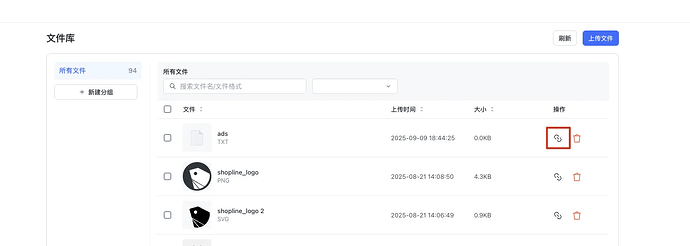
说明:

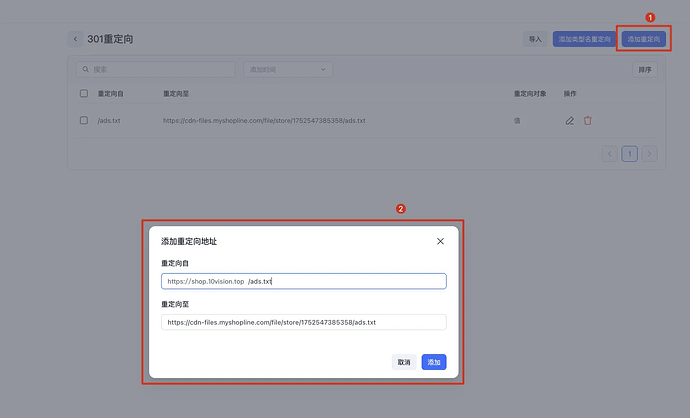
Image Srccolumn. If your export uses a different header (e.g., from a custom app), rename the column header toImage Srcbefore uploading.Yes.The JSON Schema output from SkuSync isfully compliant with the Google Merchant Center Product Feed Specification, which is the official standard for Google Shopping ads and free listings.
The generated schema includes allrequired fieldsper Google's specification:
id– Unique product identifiertitle– Product titledescription– Product descriptionlink– Product landing page URLimage_link– Main product image URLavailability– Stock statusprice– Price with currency codecondition– Item conditionbrand– Brand nameThe schema also includesrecommended fieldssuch asgtin(GTIN/EAN/UPC),mpn(Manufacturer Part Number),sku, and variant data.
This ensures your product feed can be uploaded to Google Merchant Center for Shopping ads and free listings. See theGoogle Merchant Center Product Feed Specificationfor details.
Share to